
Getting Started with the Heritage Academy App
Parents and Guardians: It’s Time to Get Connected!
Heritage Academy is excited to announce that we are no longer using Remind. We are moving to the Apptegy app as our new platform for school updates, important alerts, classroom information, messages, and other important communication from Heritage Academy.
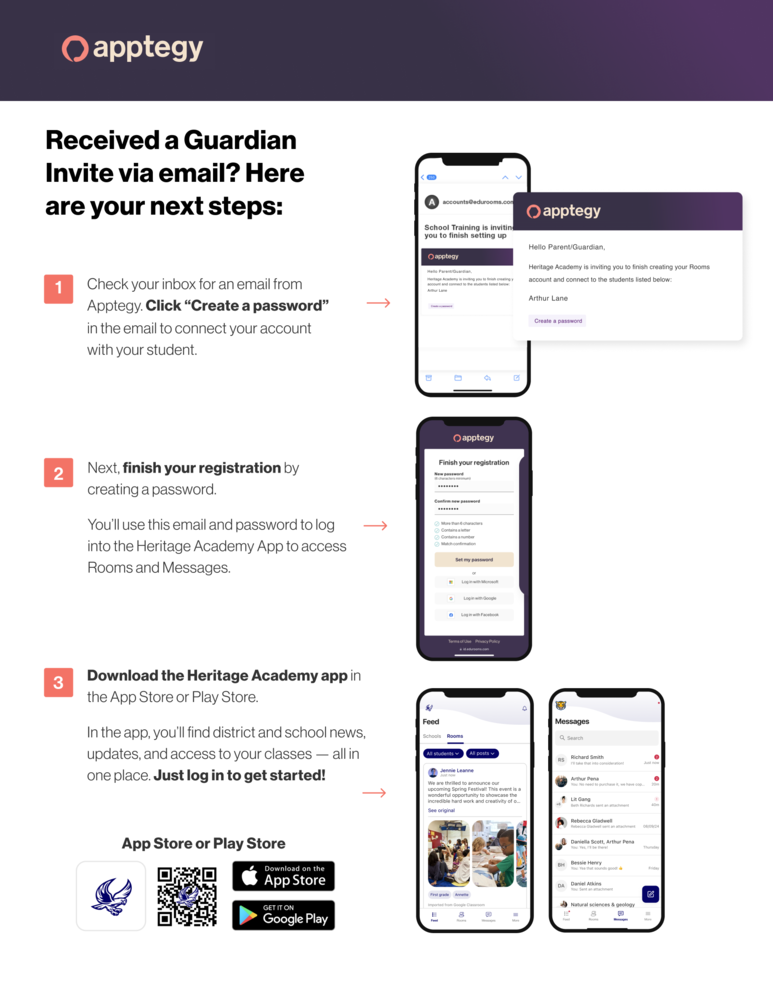
If you received an email invitation from Apptegy, getting started is easy:
Check your email for an invitation from Apptegy and click “Create a password.”
Complete your registration by creating a password. You’ll use your email and password to access your Heritage Academy account.
Download the Heritage Academy app from the Apple App Store or Google Play Store and log in to get started.
Once you’re connected, you’ll be able to access school news and updates, classroom information, Rooms, and messages from Heritage Academy, all from your phone.
Please be sure to check your email and complete your registration so you don’t miss important school updates and alerts!
For step by step instructions, please see the guide.